Enter your laptop model and we will tell you how to connect it.
We first check whether the laptop can connect directly over USB-C or Thunderbolt. If not, we will tell you whether you need HDMI, Mini DisplayPort, Surface Connect, or another adapter.
- OS
- Detecting
- Browser
- Detecting
- Screen
- Detecting
- Model
- Not available
Browsers usually cannot read the exact laptop model directly, so we only auto-detect the device environment and combine it with your input.
Enter a full model name and we will tell you whether it can connect directly and which cable to use.
Connection
Pending
Recommended cable
Pending
Fit level
Unknown
Notes
- Try a more complete model name, for example “MacBook Pro 14 2023”.
- You can also click one of the popular models above to see the output format.
Enter a full laptop model
After the page recognizes the model, this area highlights the exact cable image shoppers should recognize.
Primary option
A full-featured USB-C cable. If the laptop supports video output, this is usually the most reliable direct connection.
H5 support case
If the laptop only has HDMI, or its USB-C port does not support video output, the H5 HDMI Adapter is the cable our support team can use to solve the connection issue.
Reminder
Automatic detection in the browser usually cannot get the exact model, so the final decision still depends on the full model the user enters.
— Cable guide
Show the cable, not just the name
These visual cards help shoppers recognize the connector shape right away, so they know which cable to grab before they buy.
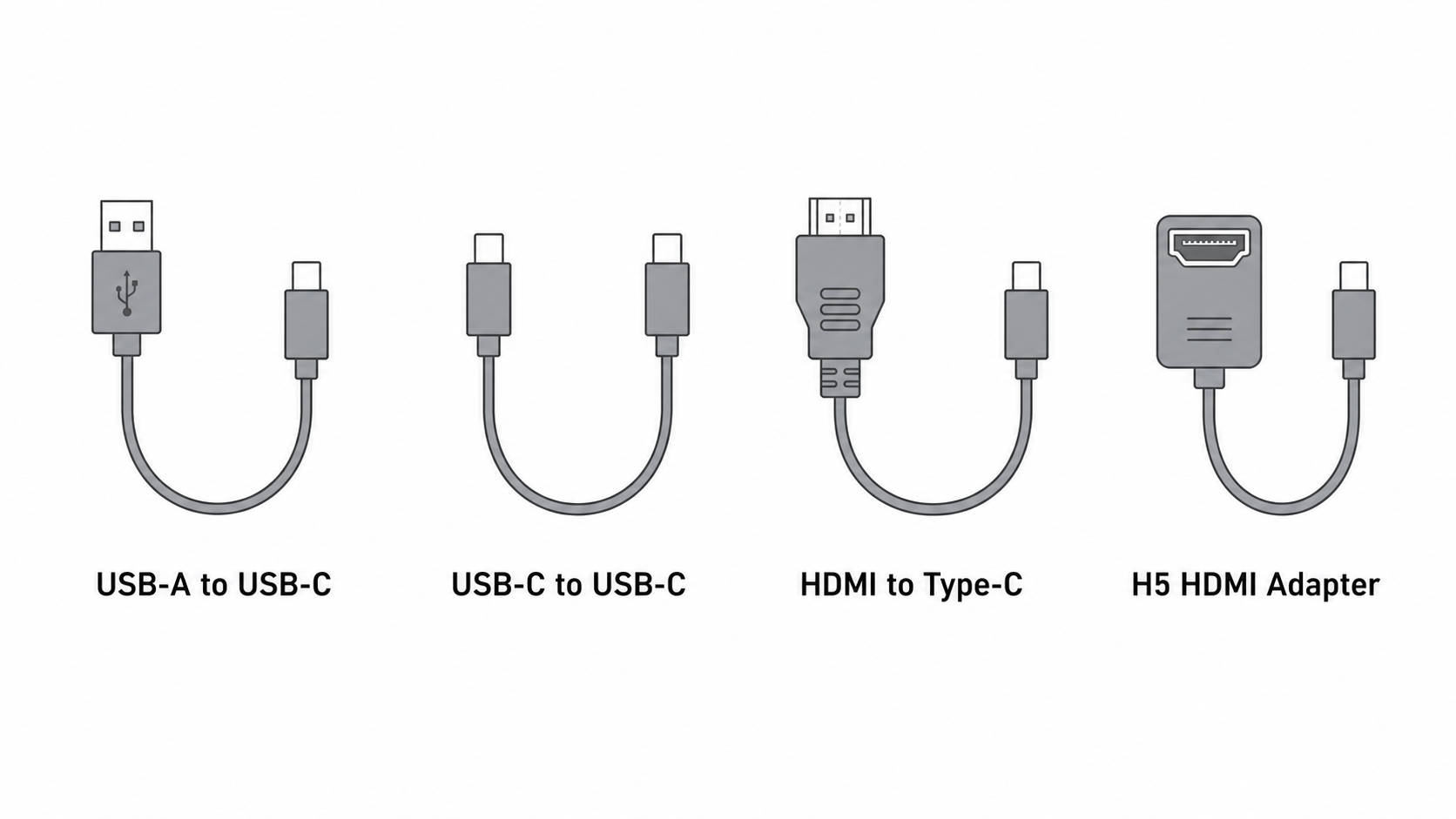
Use this only as a helper path for power or data. Standard USB-A does not carry display video by itself.
Use this when the laptop USB-C port supports DisplayPort Alt Mode, USB4, or Thunderbolt video output.
Use this for laptops with HDMI output when USB-C video support is missing or unclear.
Use this when the laptop can output HDMI but cannot drive the monitor directly through USB-C.
— Brand interface reference
Common ports by brand, before you type the model
This is the quick mental map support teams use: which brands are usually USB-C direct, and which ones often fall back to HDMI or H5.
Direct path
MacBook Air / Pro 2018+ usually direct-connect with USB-C
Fallback path
2015-2017 models often need HDMI or MiniDP-to-HDMI before H5
Direct path
XPS / modern Latitude usually direct-connect with USB-C
Fallback path
Inspiron / older business models often need HDMI or H5
Direct path
ThinkPad X1 / Yoga / newer T and E models often direct-connect
Fallback path
IdeaPad and older ThinkPad models often need HDMI or H5
Direct path
Spectre and EliteBook are most likely to direct-connect
Fallback path
Pavilion / ProBook / older Envy often need HDMI or H5
Direct path
ZenBook and many ROG / creator models often direct-connect
Fallback path
Older VivoBook and budget models often need HDMI or H5
Direct path
Swift and newer Nitro models often direct-connect
Fallback path
Aspire and older budget models often need HDMI or H5
Direct path
Surface Laptop 3 / Pro 7 and newer often support USB-C direct
Fallback path
Surface Laptop 1 / 2 and older models often need Surface or MiniDP adapters first
Direct path
Galaxy Book Flex / Pro / Book4 families often direct-connect
Fallback path
Older Samsung laptops may need HDMI or a special adapter path
Direct path
Modern LG gram and Razer Blade models often direct-connect
Fallback path
Older ultrabooks or HDMI-only configs may need H5
— Interface trends over the last decade
Start with brand, then narrow by year
This table is a quick filter for users who only know the brand and rough year. The final answer still depends on the exact model.
| Brand | 2015 - 2017 | 2018 - 2020 | 2021 - 2026 | Common fit |
|---|---|---|---|---|
| Apple | 2015-2017 mostly Mini DisplayPort / Thunderbolt 2 transition models | 2018-2020 USB-C / Thunderbolt 3 becomes the norm | 2021-2026 USB-C / Thunderbolt 4 / 5 is standard | Older laptops usually need MiniDP or HDMI; newer ones often work with one full-featured USB-C cable |
| Dell | 2015-2017 HDMI + Mini DP were common; USB-C started to spread | 2018-2020 XPS / Latitude moved mostly to USB-C | 2021-2026 USB-C / Thunderbolt is standard | Older models often need HDMI or MiniDP; newer ones usually connect directly |
| Lenovo | 2015-2017 ThinkPad often used HDMI + Mini DP | 2018-2020 USB-C spread quickly | 2021-2026 USB-C / Thunderbolt / HDMI all coexist | Older ThinkPad models often need HDMI or DP adapters |
| HP | 2015-2017 HDMI was more common, USB-C was still rare | 2018-2020 Spectre / EliteBook adopted USB-C widely | 2021-2026 USB-C + HDMI combinations are stable | Older laptops usually start with HDMI; some business models also need a power cable |
| ASUS | 2015-2017 HDMI, USB-A, and some Mini DP were common | 2018-2020 ZenBook / ROG moved gradually to USB-C | 2021-2026 USB-C / Thunderbolt and HDMI often coexist | Creator and gaming models vary a lot, so the exact model matters |
| Acer | 2015-2017 mainly HDMI | 2018-2020 Swift / Predator models started moving toward USB-C | 2021-2026 direct USB-C connection is much more common | Older models often use HDMI; newer ones are more likely to use USB-C |
| Microsoft Surface | 2015-2017 Surface Connect + some MiniDP | 2018-2020 still centered on Surface Connect | 2021-2026 USB-C is more common, but some models still need adapters | Surface Connect adapters are the key item |
| Huawei / Honor | 2015-2017 mostly HDMI / USB-A | 2018-2020 MateBook models started adopting USB-C | 2021-2026 USB-C / Thunderbolt is more consistent | Slim models often work directly over USB-C; older ones should check HDMI |
| Samsung | 2015-2017 mixed ports, with HDMI common | 2018-2020 Galaxy Book models gradually shifted to USB-C | 2021-2026 USB-C is the main option | Older models should check HDMI; newer ones often connect directly |
| LG / Xiaomi / Razer | 2015-2017 port layouts varied a lot | 2018-2020 thin-and-light models moved toward USB-C | 2021-2026 USB-C / Thunderbolt / HDMI are mixed together | Identify the exact model first, then choose the cable |